projectM Music Visualizer Pro
Sperl Heavy IndustriesMusic & Audio
4.41.11K Reviews
- Version
- 8.1.2
- Installs
- 50.00K
- Age Rating
- Everyone
Screenshots






Our Review of projectM Music Visualizer Pro
 Analysis by Appyee
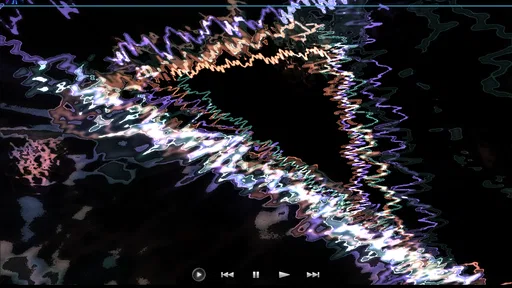
I approach a music visualizer as a companion to listening, not as a music player that needs to replace my usual setup. projectM Music Visualizer Pro is built around the pleasure of watching sound take shape: patterns shift with the track, giving familiar music a different feel without asking me to change how I listen. That makes it most appealing when I can give the screen some attention, whether I’m relaxing at home or setting a visual mood in a room.
There is also a practical trust question with any app that works alongside music: what does it ask me to do, and what choices can I actually see? I wouldn’t treat a visualizer as a reason to grant permissions automatically. I check the permission prompts on my own device, consider whether each one makes sense for the way I plan to use the app, and decline anything I’m not comfortable with. That habit is more useful than assuming an app needs broad access just because it reacts to audio.
What the app’s identity tells me—and what it doesn’t
The Android app is a paid Music & Audio release from Sperl Heavy Industries. It costs $3.99, is rated for Everyone, and has a 4.4 average from around 3,000 ratings, with roughly 1,100 written reviews. It has passed 50,000 installs, was released in December 2011, and its current version is 8.1.2, requiring Android 8.0 or later. Those details give me a sense of its place in the Android catalog, but popularity and longevity aren’t a substitute for checking whether the app’s present-day behavior suits my own expectations.
I’m careful not to read more into those figures than they say. A rating can tell me that many people have found the app worth using, but it can’t tell me whether its visual style suits my taste or whether my particular audio setup will work smoothly. I would use the trial-and-decision window available to me—install, inspect the prompts and controls, test a few familiar tracks, then decide whether the paid experience earns its place on my device.
Getting Into the Groove with projectM
So, what makes projectM Music Visualizer Pro stand out in a sea of music visualizers? First off, the sheer variety of visualizations is staggering. We're talking hundreds of different patterns that react to your music in real-time. Whether you're into mellow ambient tunes or bass-heavy tracks, there's a visualization here that'll sync perfectly with your sound.
Setting up the app is a breeze. Just download it from your app store, and you’re good to go. The interface is sleek and intuitive, which means you can jump right into the action without any fuss. Plus, you can tweak the settings to your heart's content. Want more symmetry? Crank it up. Prefer a psychedelic swirl? They've got you covered.
Features That Hit the Right Note
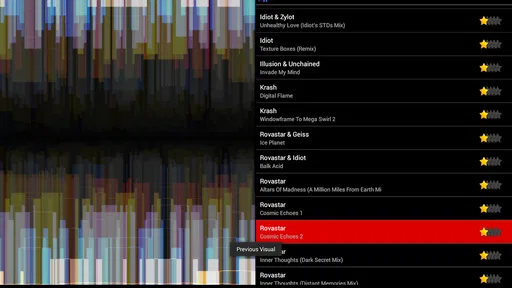
Now, let’s talk features. One of my favorite aspects of projectM is its customizability. You can adjust the speed, complexity, and even the color schemes of the visualizations. It’s like being a DJ for your eyes! Not to mention, you can save your favorite presets and easily switch between them depending on your mood.
Another cool feature is its compatibility. Whether you’re listening through Spotify, Apple Music, or your local library, projectM syncs effortlessly. It’s seamless and hassle-free, allowing you to focus on what matters most: the music and the visuals.
Choosing it for the right kind of listening
What I would add to that enthusiasm is a little care about the situation. A visualizer is at its best when the phone or tablet can stay in view and the music can keep playing without interruptions. For a quiet evening, I might put on an album, set a visual style that doesn’t compete with the room, and let the patterns provide a gentle focal point. For a livelier gathering, I’d choose more energetic imagery and place the screen where people can glance at it without crowding around one small display.
There’s a useful distinction between using this as a personal listening accessory and expecting it to act like a full party-lighting system. projectM changes what you see on its screen; it doesn’t turn the device into a room-wide lighting rig. If your goal is large, synchronized lighting across a venue, dedicated hardware or a lighting app designed for that setup is a better fit. If you simply want music to have a visual layer on a nearby screen, this is the more direct and personal option.
It can also make a familiar playlist feel less passive. I might use it while listening to instrumental music during a low-key creative session, letting the movement add atmosphere without putting on a video. That works best when I don’t need to keep looking at the screen. If I’m reading, working through a task, or trying to sleep, animated color can become a distraction rather than an enhancement, so I’d leave the visualizer off and keep the music in my regular player.
Small choices that make a session work better
One practical tip is to settle on a few presets rather than constantly browsing. When the display is part of the mood, repeated menu stops break the flow. I’d save a restrained look for quieter albums and a more dynamic one for tracks with strong changes in rhythm, then switch only when the music calls for it. That makes the app feel less like a collection of effects and more like a considered part of a listening routine.
It’s also worth judging a preset over more than a few seconds. A pattern that looks exciting at first can become tiring across a whole album, especially in a dark room or at close range. I’d lower the visual intensity by choosing calmer colors or slower movement when possible, and use busier presets for short demonstrations rather than leaving them on all evening. The point is not to make every track look spectacular; it’s to find a presentation I’m still comfortable seeing after the novelty wears off.
For an everyday example, imagine getting home, putting on music while tidying, and setting a tablet on a shelf where it is visible from across the room. A visualizer can make that ordinary playlist feel more present without requiring me to select a music video or keep handling the device. The trade-off is that the screen has to remain on and positioned for viewing, so I’d think about battery use and screen comfort in that situation rather than treating it as something to run unattended indefinitely.
Compatibility, controls, and the limits of a visual layer
The original appeal is that the visuals can accompany listening through familiar music sources, rather than making me rebuild my library around a separate player. Even so, I would test the exact combination I use most: start a track in the service or library I normally choose, open the visualizer, and see whether the result behaves as expected on my device. Music apps and operating systems can handle audio differently, so a quick real-world check is more meaningful than assuming every source will behave identically.
I also wouldn’t confuse visual customization with control over the audio itself. The attraction here is the responsive display and the ability to shape its appearance; anyone looking for a full equalizer, playlist manager, or replacement streaming service should choose a tool built for those jobs. The usual alternative is to rely on album art or a music video, which is simpler and often uses less attention. projectM is more interesting when I want movement generated from the sound, but less useful when I want the artist’s intended visuals or a screen I can ignore completely.
Another trade-off is that the same effect can feel different depending on the room and the track. A fast, high-contrast pattern may suit energetic music but feel overbearing beside quiet vocals. I’d treat preset choice as part of the listening setup, not as a one-time setting that is guaranteed to work for everything. That small adjustment is especially helpful if other people are sharing the space, since a visual style that feels immersive to me may be distracting to someone else.
When a visualizer doesn’t respond the way I expect, I’d first check the simple things: whether music is actively playing, whether the chosen audio source is compatible in that session, and whether the device’s audio or battery settings are limiting background behavior. I wouldn’t assume a permissions prompt is harmless or necessary without reading it. If a permission seems unrelated to my intended use, I’d pause and make a deliberate choice rather than approving it simply to get past setup.
What I look for before making it part of my routine
The clearest user control is the ability to shape the visible experience through settings and saved presets. Those choices matter because they let me make the display less intense, more symmetrical, or more colorful according to the space and music. I’d spend a few minutes learning where those adjustments live before using the app in front of guests; it’s easier to prepare a comfortable look in advance than to fiddle with controls once the room is already listening.
For data-sensitive use, I keep the distinction between what I can inspect and what I cannot establish. I can review the operating system’s permission prompts and the app’s visible controls, but I don’t infer a privacy policy, account system, or data-handling practice from the visualizer’s purpose or its presence in a store. If privacy is a deciding factor, I’d read the current disclosures presented on the device or in the store and make the decision from those, not from assumptions about how an audio app must work.
I also consider who else may be affected. If I’m displaying visuals in a shared room, I can choose a less intense preset or turn the screen away when someone finds it distracting. If I’m using headphones in a public place, the visual effect is mainly for me, and I can keep the phone close rather than making the display a spectacle. Those are small choices, but they make the app easier to fit around other people instead of expecting everyone to adapt to it.
Who should choose it—and who may be happier without it
I’d recommend it to someone who enjoys MilkDrop-style visuals, likes tuning the look of an effect, and already has a preferred way to play music. The strongest use case is not finding new songs; it’s giving tracks you already know a changing visual companion. If you enjoy comparing patterns and settling on presets for different moods, there’s more to engage with than a single looping animation.
I’d skip it if I mostly listen with my screen off, want an audio-first app with no visual distraction, or expect lighting effects to fill a room. It may also be the wrong choice if I’m unwilling to pay for a dedicated visualizer or if I need a guaranteed match with a particular device and audio workflow before trying it. In those cases, the built-in now-playing screen, album artwork, or a free visual option may be enough, even if it offers less room to shape the display.
That comparison is the main buying question for me: do I want a generated visualization, or do I want something else on screen? Album art is quieter and tied directly to the release; music videos add the artist’s own imagery; a visualizer creates patterns that respond to the sound. None is universally better. projectM earns its place when the third option is exactly what I’m after, not merely because I happen to be listening to music.
Features That Hit the Right Note
Now, let’s talk features. One of my favorite aspects of projectM is its customizability. You can adjust the speed, complexity, and even the color schemes of the visualizations. It’s like being a DJ for your eyes! Not to mention, you can save your favorite presets and easily switch between them depending on your mood.
Another cool feature is its compatibility. Whether you’re listening through Spotify, Apple Music, or your local library, projectM syncs effortlessly. It’s seamless and hassle-free, allowing you to focus on what matters most: the music and the visuals.
Why You’ll Love It
If you're a fan of nostalgia, this app will hit you right in the feels. It's a modern take on classic visualizers, with a touch of sophistication and an endless array of options. Plus, it runs smoothly without any annoying lag or crashes, which is a massive win in my book.
What really sets projectM apart, though, is its ability to transform your music-listening experience. It’s not just about the visuals; it’s about creating a connection to your music on a whole new level. Every beat, every note, comes alive in a kaleidoscope of colors and patterns. It's mesmerizing, to say the least.
Is It Worth the Download?
In my opinion, projectM Music Visualizer Pro is worth every penny. It's not just an app—it's an experience. Whether you're hosting a party or just chilling at home, it adds an extra layer of enjoyment to your music-listening sessions.
So, if you're ready to see your music in a whole new light, give projectM a shot. Trust me, once you dive into those hypnotic visuals, you'll wonder how you ever listened to music without it.
Ready to transform your music experience? You can find projectM Music Visualizer Pro on both the Google Play Store and the Apple App Store. Happy visualizing!
Verdict
Strengths of projectM Music Visualizer Pro
- Highly customizable visual effects.
- Syncs perfectly with your music.
- Supports a wide range of audio players.
- No intrusive ads during use.
- User-friendly interface.
Limitations of projectM Music Visualizer Pro
- Consumes significant battery power.
- Requires a powerful device for best performance.
- Limited offline capabilities.
- No free trial available.
- Occasional app crashes reported.
Other Releases by Sperl Heavy Industries
View All
projectM Music Visualizer TV
Music & Audio3.0
Similar Picks in This Category
View All
YouTube Music
Google LLC4.4

Samsung Music
Samsung Electronics Co., Ltd.3.8

Spotify: Music and Podcasts
Spotify AB4.3

JioSaavn - Music & Podcasts
Saavn Media Limited4.3

Lark Player:Music Player & MP3
Lark Player Studio - Music, MP3 & Video Player4.6

StarMaker: Sing Karaoke Songs
SKYWORK AI PTE. LTD.4.3
Frequently Asked Questions
What is projectM Music Visualizer Pro, and how does it work?
projectM Music Visualizer Pro is a dynamic app that creates captivating visual effects in response to your music. Using advanced algorithms, it transforms audio input into stunning visual patterns, enhancing your listening experience. Simply play your favorite tracks, and watch as the app generates mesmerizing visuals that dance to the rhythm.
Is projectM Music Visualizer Pro compatible with all music apps?
Yes, projectM Music Visualizer Pro is designed to work with a wide range of music apps on both Android and iOS devices. Whether you're using Spotify, Apple Music, or any other music player, projectM can sync with the audio output, ensuring a seamless visual experience across all your favorite tunes.
Does projectM Music Visualizer Pro consume a lot of battery or data?
While projectM Music Visualizer Pro is optimized for performance, running elaborate visuals can consume additional battery power. However, it does not use data since it processes audio input from your device. For prolonged use, it's advisable to have your device charged or connected to a power source.
Can I customize the visual effects in projectM Music Visualizer Pro?
Absolutely! projectM Music Visualizer Pro offers a variety of customizable settings. Users can adjust colors, patterns, and visual styles to tailor the experience to their liking. Additionally, the app includes a library of presets, allowing you to explore different visual themes effortlessly.
Is projectM Music Visualizer Pro user-friendly for beginners?
Yes, projectM Music Visualizer Pro is designed with user-friendliness in mind. The interface is intuitive, allowing even beginners to navigate and customize their visual experience with ease. The app provides helpful tutorials and guides to ensure users can make the most out of its features without any prior experience.
